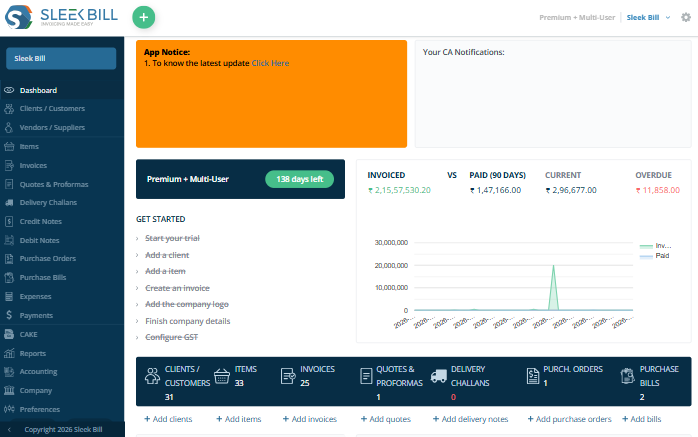
Extend Sleek Bill with custom workflows, modules, dashboards, approvals, APIs, portals, mobile applications and industry-specific automationโwithout rebuilding billing, GST, inventory and reporting from scratch.
Disconnected systems, duplicate entries, unsupported workflows and limited reporting reduce efficiency and make scaling difficult.
Billing, GST, inventory, purchases, customers, suppliers, reports, e-Invoice and e-Way Bill already exist, allowing development to focus on your unique operations.
Custom ERP becomes valuable when operational complexity creates delays, errors and poor visibility.
Teams enter the same information across applications and spreadsheets.
Sales, purchase, inventory, finance and operations do not share one data flow.
Approvals, alerts and tasks depend on manual follow-up.
Management lacks real-time KPIs and business-specific dashboards.
Use the existing platform as the base layer and add only what your organization requires.
Reduce project scope, risk and development time by building on existing billing, GST, inventory, purchase and reporting functionality.
Invoices, quotations, challans, credit and debit notes.
GST reports, e-Invoice and e-Way Bill workflows.
Products, barcode, batch, serial and stock movement.
Sales, purchases, expenses, ledgers and stock reports.
A structured process reduces confusion, scope gaps and deployment risk.
Study processes and pain points.
Document workflows and roles.
Design data, APIs and security.
Build modules in sprints.
Test, migrate and train.
Each module can follow your process, approvals, reports and user roles.
Billing, receipts, payments, ledgers, journals, tax and reports.
Leads, opportunities, quotations, orders, invoices and collections.
Requests, approvals, orders, vendors and purchase bills.
Warehouses, transfers, batch, serial, barcode and valuation.
BOM, work orders, planning, consumption and quality checks.
Employees, attendance, leave, payroll and performance.
Asset register, depreciation, maintenance and AMC.
Projects, tasks, milestones, resources and cost tracking.
Tickets, complaints, field teams and service schedules.
Integrations reduce duplicate entry and create smoother payment, commerce, messaging and compliance workflows.
Exchange data between ERP modules and external platforms using secure APIs.
Exchange selected masters and transactions. Keep customer, product, and transaction data connected across your existing business systems.
Connect invoices and payment collection. Make it easier for customers to pay invoices and keep payment records updated.
Synchronize orders, items and stock. Keep online orders, product details, and inventory levels aligned with your billing system.
Automate reminders and document sharing. Send invoices, payment reminders, and important business documents directly to customers.
Automation improves consistency, accountability and turnaround time.
Use triggers and approval rules to keep work moving without constant manual coordination.
Send purchases, discounts, and expense requests to the right person for approval. Create a clear approval process so important business decisions are reviewed before they are finalized.
Get timely notifications when inventory reaches a predefined level. This helps your team reorder products on time and reduce the risk of running out of essential stock.
Monitor invoice payments and identify pending or overdue amounts. Use due dates to plan follow-ups and improve your cash flow management.
Automatically forward pending or unresolved tasks to the next responsible team member. Keep important work moving.
Industry modules are designed around real operational flows instead of generic screens.
BOM, work orders, production, quality and finished goods.
Stock movement, dispatch, routing and dealer workflows.
POS, branch reporting, loyalty and franchise controls.
Projects, procurement, subcontractors and site expenses.
Billing, inventory, appointments and service workflows.
Admissions, fees, attendance, HR and reports.
Multi-currency, export invoices and logistics documents.
CRM, projects, timesheets, billing and client portals.
Invoices, Recurring Invoices, payments reports.
Plan deployment around accessibility, control, security and infrastructure.
Remote access, centralized updates and scalable infrastructure.
Best for distributed teams
Deploy inside your infrastructure for internal policies and control.
Best for controlled environments
Combine local systems with selected cloud services.
Best for phased transformation
Security is designed into architecture, access, integrations and operations.
Control who can access data, which actions they can perform and how important events are recorded.
Keep accounts protected with secure login and session controls. Help prevent unauthorized access and ensure only verified users can enter your business system.
Give employees access only to the features and actions they need for their work. This helps protect sensitive business information while keeping responsibilities clearly defined.
Maintain a record of key activities, updates, and user actions within the system. Use these records to review changes, improve accountability, and identify unusual activity when required.
Prepare reliable backup and restoration procedures for important business data. A planned recovery process helps reduce disruption and supports when unexpected data issues occur.
Each stage has clear deliverables and review points.
Understand objectives, departments, current systems, pain points and growth plans.
Document features, workflows, roles, reports, security and acceptance criteria.
Create wireframes, process maps, data models, APIs and deployment architecture.
Build in sprints and test functionality, performance, security and integrations.
Import data, train users, validate workflows and deploy the production system.
Improve adoption, performance, integrations and features as the business evolves.
Compare fixed software with a configurable ERP built around your processes.
Click any question to expand the answer.
Explore our multiple tools
Start with Sleek Billโs proven billing, GST, inventory and reporting foundation, then add the workflows, modules, integrations and dashboards your organization actually needs.