$
Invoice in a customer currency
Quote an amount in the currency agreed with your customer. A USD invoice for a US client is easier to understand than asking them to interpret a price written only in INR.
Invoice overseas customers in their preferred currency, define favorable payment terms and keep billing systematic by leveraging international invoicing capabilities of Sleek Bill. This application helps create professional looking invoices, quotation and other business documents for companies dealing in international business.
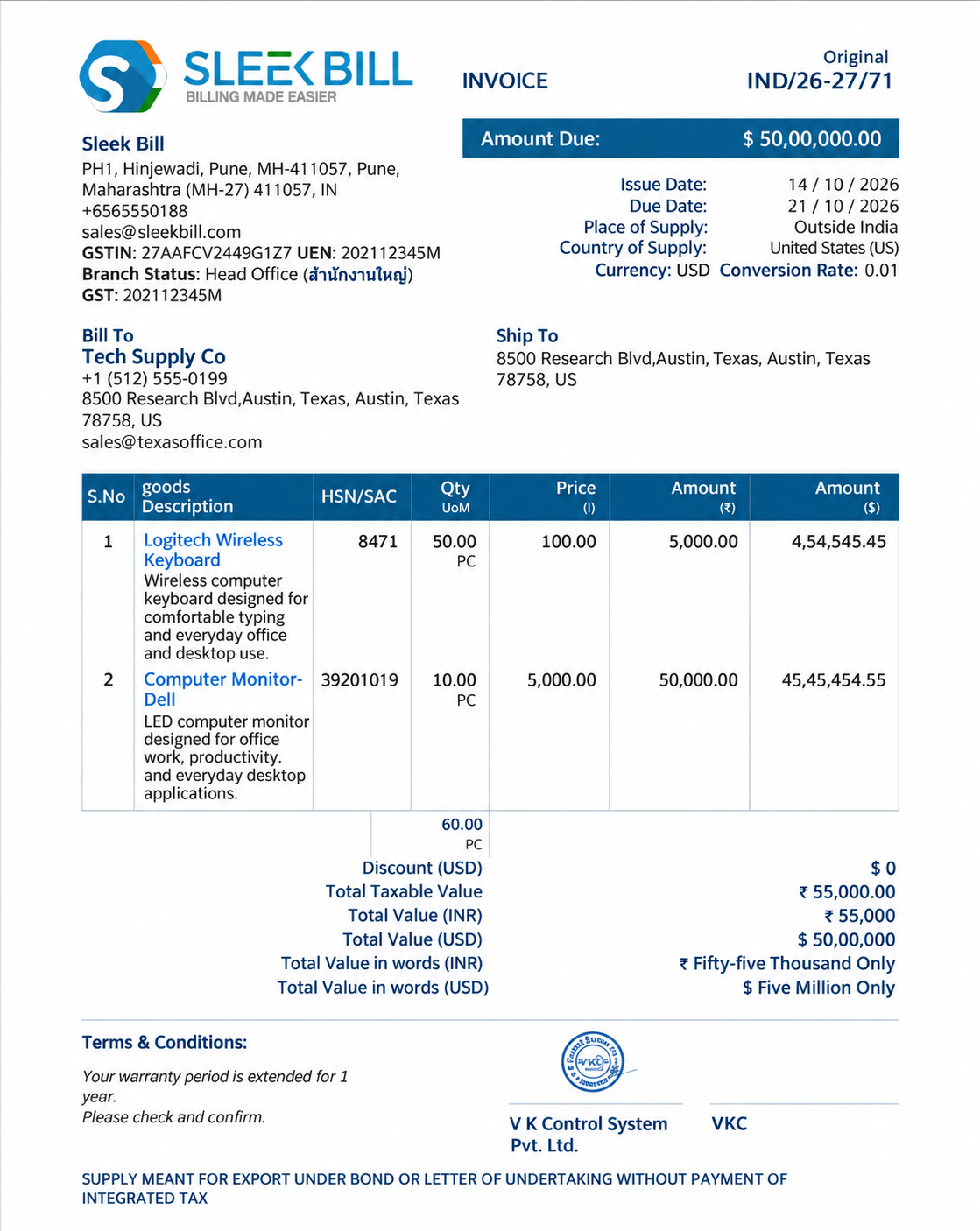
Ever dealt with selling something to a client overseas and wondered how to bill them without the math headache? That’s where multi-currency invoicing software helps. It lets you create bills in different currencies, such as US dollars or euros, based on what your customers use. It also helps you manage payments, keep your records neat, and make it easy for customers to understand how much they need to pay.
Quote an amount in the currency agreed with your customer. A USD invoice for a US client is easier to understand than asking them to interpret a price written only in INR.
Currency codes, symbols, decimal precision and payment instructions reduce ambiguity. Clearly indicate whether amounts are in USD, EUR, GBP or another currency.
Track the original invoice amount and reconcile what your bank actually receives, taking conversion rates, transfer charges and partial payments into account.
Important distinction: Sending an invoice in a different currency isn’t the same as automatically converting the money, taking international card payments, or handling tax returns in another country. Those are separate steps and responsibilities.
Here are all popular business currencies you can use with the business selling currency feature: US dollar (USD), euro (EUR), British pound (GBP), Indian rupee (INR), UAE dirham (AED), Australian dollar (AUD), Canadian dollar (CAD), and Singapore dollar (SGD). Just remember, this isn’t a complete list for every version or plan of Sleek Bill—some currencies might only show up in specific situations .
When you’re billing in a foreign currency, you can pick the currency for each document or set it at the company level by going to Document options, choosing from the Document drop-down, or checking Company options. Change the existing value with the rates you have agreed on, check the currency symbol and the symbol, and check the output before sharing. The selection s teps will vary slightly between Sleek Bill Online, Desktop, and mobile solutions.
Check the current availability for a particular currency or workflow with support before you purchase. Inquire about being able to choose the currency on an invoice basis, whether it is stored for repeat customers, and whether reports will reflect the same currency or a base currency. Sleek Bill support Global Currencies
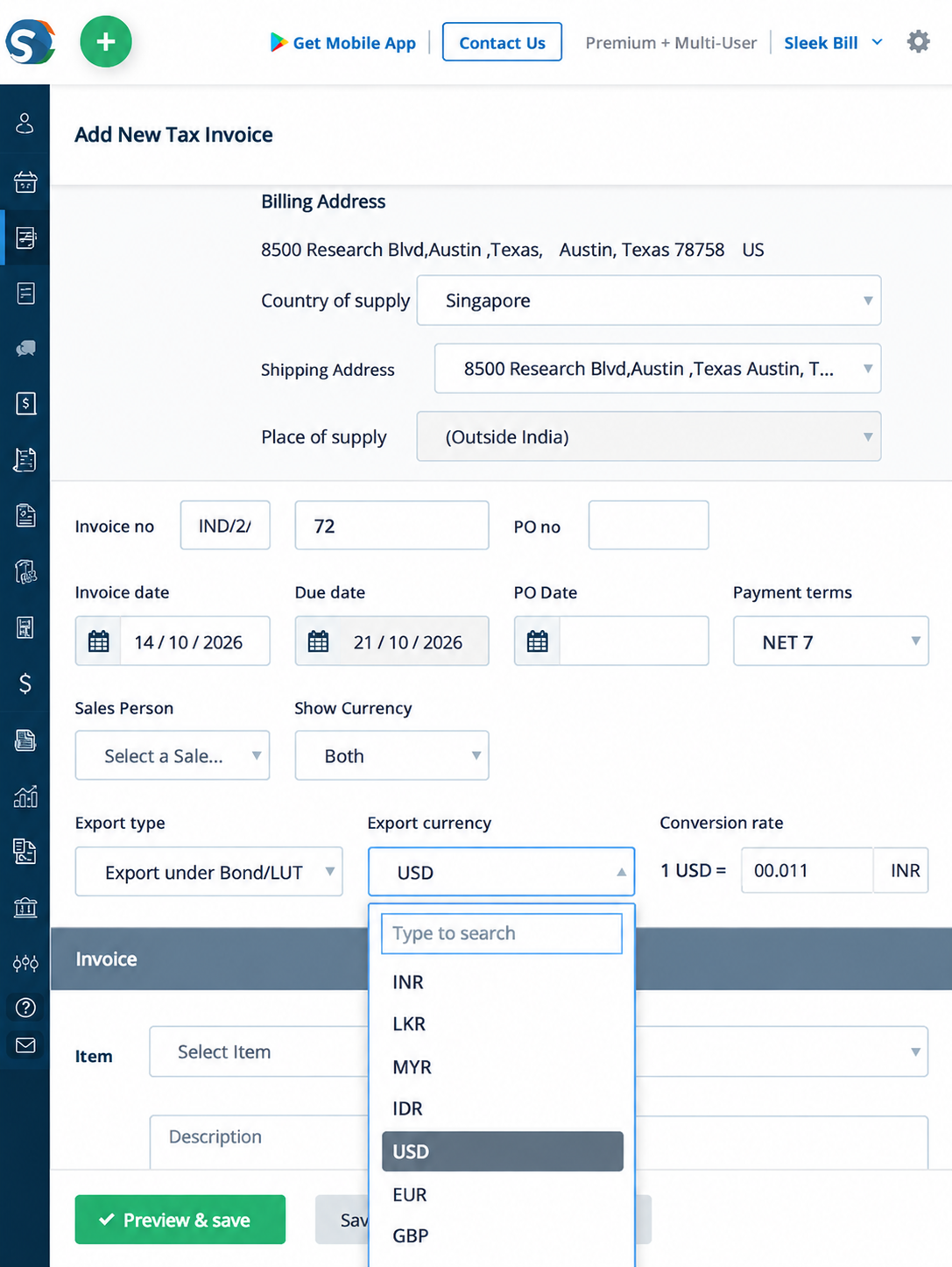
International invoicing should begin with a clear commercial agreement, not with a currency converter. Follow this practical checklist to prepare a professional invoice that your customer can understand and your finance team can reconcile.
Record the overseas customer's legal name, address, country, billing contact and any identification needed for the transaction. Use the correct seller details as well.
Before preparing the invoice, agree on the currency in which the payment will be processed. The invoice should indicate if the overseas buyer has to pay a fixed USD amount, a converted INR amount or another pricing mechanism.
For each service or product, write a clear description, quantity, rate, any discounts, plus shipping or handling costs. Double-check your decimal places so every line and the final invoice match up.
Figure out if the goods are being exported, where the supply is happening, and what local VAT or sales tax rules apply. Gather any supporting documents you need. Just because you’re dealing in a foreign currency doesn’t automatically decide which tax applies.
Give a specific due date, the beneficiary’s bank information, a payment reference, the currency for payment, and say up front who covers any transfer fees. Don’t promise a settlement to amount you can’t guarantee.
Compare what you invoiced in the agreed currency with what you actually get paid. If payments are partial, or if there are fees or conversion discrepancies, record those using your normal accounting process and whatever tools you have at hand.
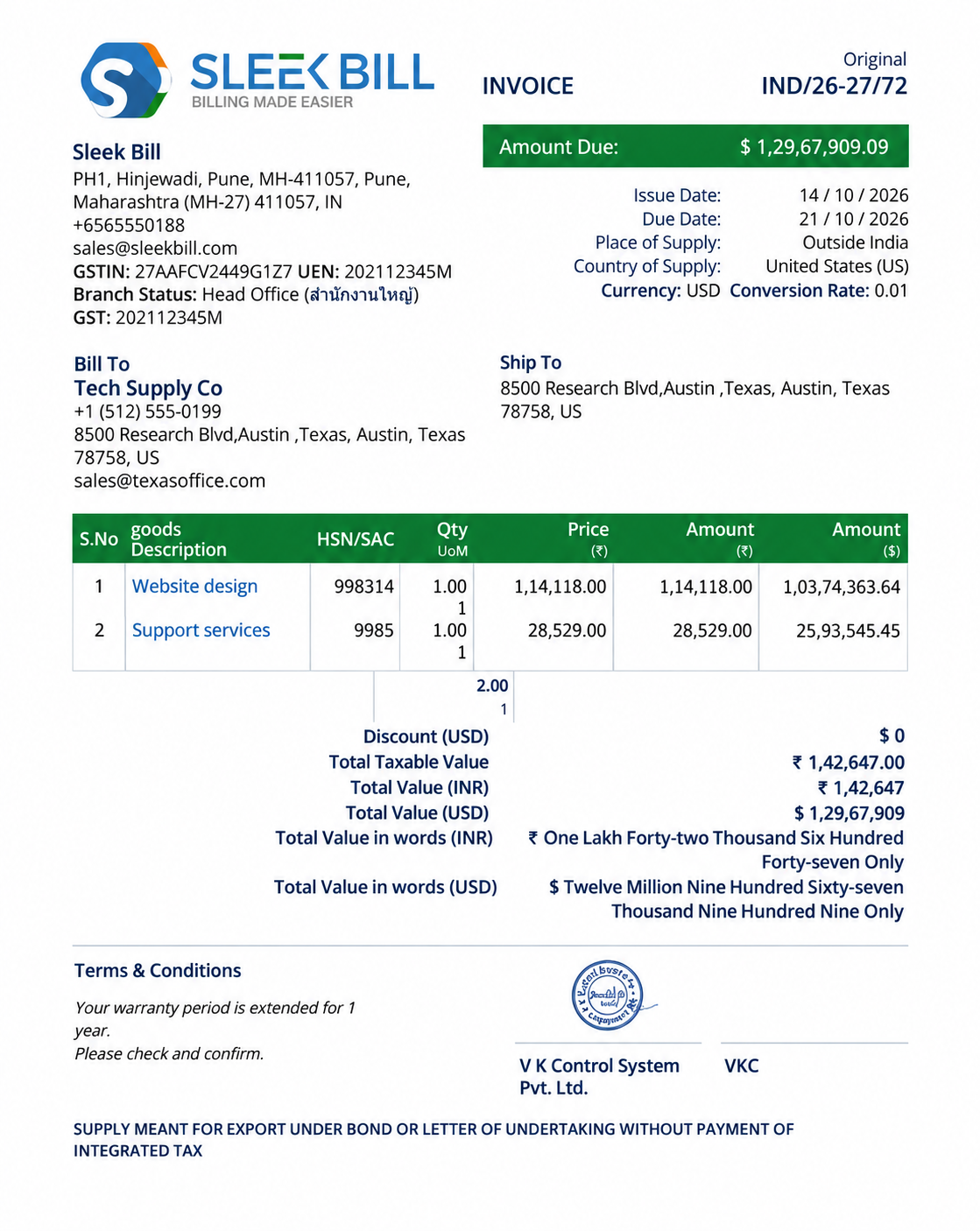
Imagine a design agency in India works out a deal with a client in Texas to redesign their website and provide a month of support. Both agree to settle in US Dollars, with payment due within 7 days. So, the agency sends over an invoice for $1,29,67,909.00.
That invoice covers everything: seller and buyer names, the scope of work, USD unit prices, the total amount, a unique invoice number, issue date, and payment instructions. It also includes any export declarations or tax details needed by law for that particular transaction.
When the customer pays, the bank may credit the agency in INR at the applicable conversion rate, less any fees. The agency should check the payment received against the original USD invoice and update its accounting records. Sleek Bill Multi Currencies Service Invoice.
Cross-border billing gets a little tricky. You’ll often see two different amounts: the total on the invoice in your customer’s currency, and then what you actually receive or record in your own currency. Here’s a quick example: if you send a USD 1,500 invoice and the exchange rate is ₹95.08 per dollar, that adds up to ₹1,42,620.00—before you even think about bank fees, taxes, or other adjustments.
The exchange rate used when preparing a quotation may be different from the rate applied by the bank when the payment is received. Rates can also vary depending on the provider, transaction date and agreed contract terms. Keep a record of the exchange rate source and date for accounting and reporting purposes.
| Invoice total | USD 1,500.00 |
| Illustrative exchange rate | ₹95.08 per USD |
| Reference INR value | ₹1,42,620.00 |
| Illustrative bank charges | ₹1,000.00 |
| Illustrative net credit | ₹1,41,620.00 |
Numbers are educational examples, not current market exchange rates or a product-generated report.
Payment tracking becomes more important when invoices and settlements are in different currencies. A business may issue an invoice for USD 1,500, receive USD 900 first, and collect the balance later. Each receipt can be associated with a different conversion rate or fee.
Follow outstanding and partially paid invoices. Check how the specific version of Sleek Bill that you use displays foreign currency balance before you start using report.
Find out if the invoice amount differs from the actual local currency amount credited to your account. There may be exchange gains or losses that must be treated differently depending on the applicable accounting principles.
Make sure you register the transaction ID, the remittance slip, bank charges, date, etc. This information may come in handy to answer customer questions and inquiries if there are any discrepancies. .
Sleek Bill offers different software options, including Desktop and Online versions. Some features may work differently depending on the version, country and subscription plan.
Before buying, check the following points when you buy product:
| Capability | What to check | Why it matters |
|---|---|---|
| Foreign-currency invoice | Which currencies can be selected, and can currency change per document? | Ensures the buyer sees the agreed billing currency. |
| Quotation currency | Can quotes and invoices use the same selected currency? | Helps keep commercial terms consistent. |
| Dual-currency display | Confirm explicitly; do not assume both invoice and base currency appear. | Useful only where supported and legally appropriate. |
| Exchange rates | Manual entry, automatic lookup or no built-in conversion? | Determines whether rate handling is done inside or outside the product. |
| Partial payments | Does the selected edition track receipts in invoice currency? | Important for international receivables. |
| Currency-based reports | Are totals shown per currency or converted into a reporting currency? | Avoids adding unlike currency amounts. |
| Country-specific tax rules | Confirm each market's VAT/GST and export-document functionality separately. | Currency support is not proof of tax compliance. |
For current pricing and plan inclusions, see global pricing or request a demonstration. No unverified feature or currency count is presented here as a universal entitlement.
Just putting USD or EUR on your invoice doesn’t mean you’re following all the rules for US sales tax, EU VAT, UK VAT, or Indian GST. Tax laws depend on where you and your customer are located, the kind of products you’re selling, whether you’re registered for taxes, and a few other details.
Indian exporters: look into GST export invoicing requirements, LUT or IGST treatment wherever applicable, mandatory particulars and any applicable foreign exchange documents. Other countries: look into invoice requirements in local law, any tax numbers that are mandatory, currency conversion requirements for tax reporting and digital invoicing obligations.
Sleek Bill's country specific pages and relevant product documentation can help you identify the tools you have, but final compliance decisions should be made with a qualified tax professional. Don't assume a currency dropdown makes a tax rate or makes a filing on your behalf.
See the global Sleek Bill site for regional solutions and verify current coverage with the team.
International invoicing is useful when there is agreement between the buyer and seller about making the deal in different currencies. The examples below should make it easier to invoice your overseas business partners without implying that everyone's tax systems are the same.
When you’re invoicing customers in other countries, keep your product descriptions simple and easy to understand. List prices in the correct currency, mention how and when you’ll ship the goods, and attach the export documents required. It helps to stay in touch with your logistics and finance contacts so your shipments stay within the rules.
Issue invoices to overseas clients for completed projects, retained fees and monthly charges in the currency of your choice. Specify the amount in a foreign currency that will be converted into your local currency.
Send clean, professional invoices to international clients. Spell out what you did—like design, writing, or development—include the total, the currency, and how you want to be paid. .
Maintain consistent product descriptions and pricing for overseas customers. Keep your sales, purchase and shipping records organized for your internal business needs.
Clarify the terms of your ongoing charges or project costs without putting your overseas customer in the position of working out how much they owe you in their local currency.
Analyze foreign currency invoice amounts, bank receipts, overdue payments and any adjustments to the figures for preparing financial and tax-related documents.
Clear and practical answers to questions businesses often ask when invoicing international clients.
Multi-currency invoicing is designed for that purpose. Check whether USD, EUR or your required currency is available in your Sleek Bill edition and plan, and confirm the currency shown on the final invoice.
Sleek Bill supports all Currencies that can be used for international invoicing include USD, EUR, GBP, AED, AUD, CAD, SGD and INR. This is a demand-based list and not an official list of supported currencies in all product versions. Please ask Sleek Bill to verify your currency and product version.
It’s necessary to come to an agreement with the customer regarding the currency. Then you have to pick the available currency in the respective product settings or invoice workflow..
Automatic live-rate updates have not been verified for every Sleek Bill edition or plan. Confirm whether your setup supports automatic rates, manual rates or invoice-currency display without conversion.
Dual-currency display should only be expected if it is supported by your specific product edition, template and plan. Verify this in a demonstration before relying on it.
Use the currency's appropriate decimal precision, verify line-item calculations and tax totals, and apply a consistent rounding policy. Preserve the original agreed invoice amount for reference.
The local-currency amount received can differ from the reference value when the invoice was issued. Reconcile the receipt, bank fees and any exchange difference under your accounting policy.
Tracking paid and unpaid invoices is useful for cross-border trade, but the handling of partial payments in foreign currencies should be verified for your Sleek Bill edition and plan.
No. Currency denomination and tax compliance are separate. Confirm applicable GST, VAT, export, e-invoicing and invoice-content rules for the transaction and relevant country.
Visit Sleek Bill's global pricing page and ask the team to confirm supported currencies, exchange-rate features, dual-currency display, reports and payment tracking for the plan you are considering.
Ensure overseas customer invoices are professional, currency amounts clear and payment expectations are easy to understand. See what Sleek Bill's available plans offer and confirm what international billing features are important for your business.
View Sleek Bill pricing →